 Day One Fixes
SolvedHow-toUpdated 2026-11-04
Overwatch Best Settings ( Serious )
Short answer
Overwatch Best Settings for both competetive and casual players Tip : Please click on the images if you have difficulty reading what's written properly
Steam Community guide by Knish.
Display Settings
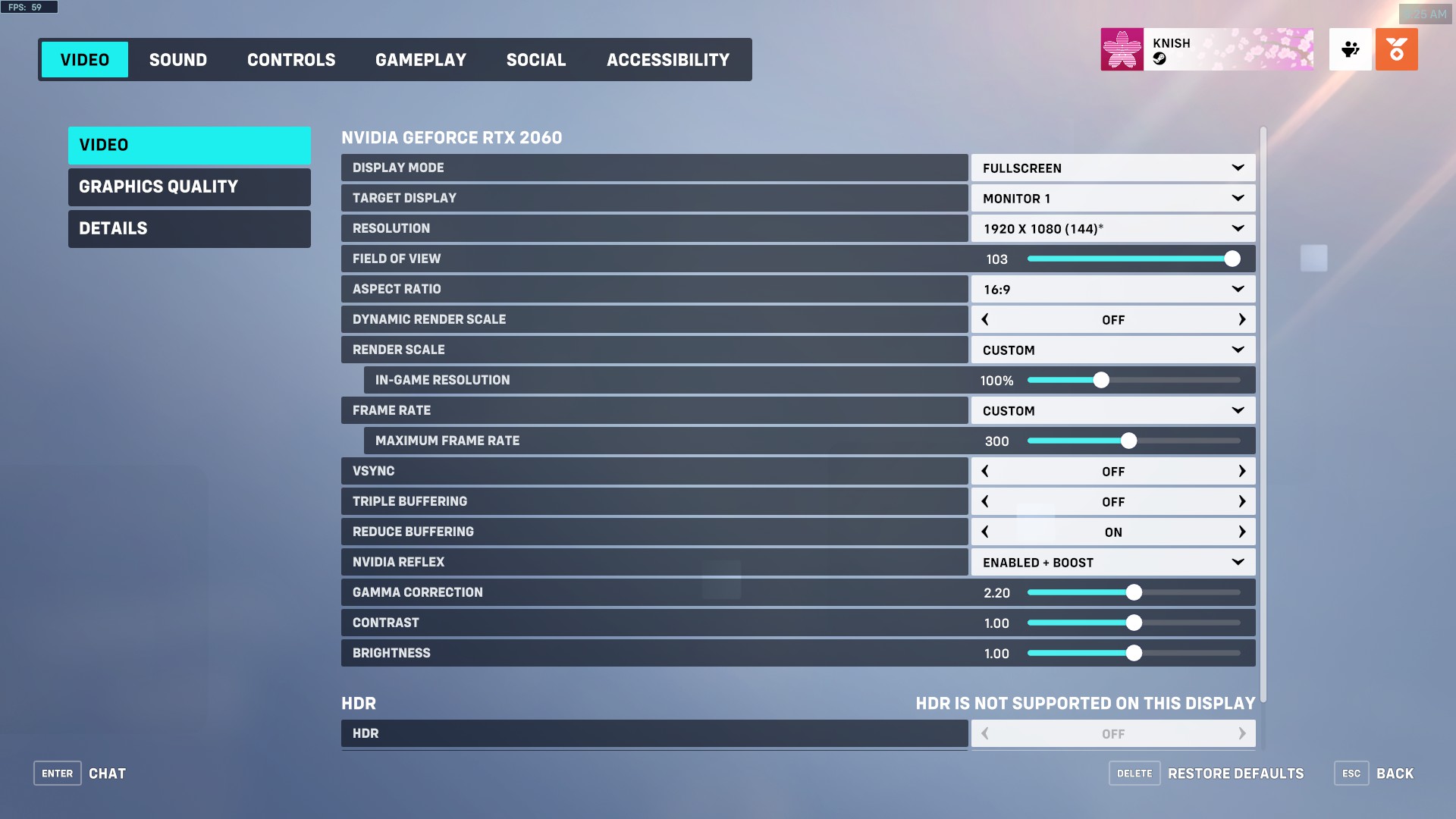
Key Display Settings to keep in mind :
Display Mode : Fullscreen (for least amount of latency)
Resolution : Max sure to pick your highest Refresh rate in the Brackets
if you have a 144hz 1080p monitor it should say 1920x1080 (144)
FOV : Personal preference but best to leave it at 103
Dynamic render scale : Off
Render scale set to custom and at 100
Reduce Buffering ON
Nvidia Reflex :
Enabled
Use Enabled + Boost for best performance but while forcing GPU to constantly run at max clock
Graphic Quality Settings
For Best Visuals + Performance
Use High Quality Upscaling for FPS BOOST but GRAINY VISUALS at times
Texture Quality High if more than 4gb VRAM
Texture Filtering 8x or 16x

- It makes Textures Further away crisper in quality
Fog LOW
Dynamic Reflections off
Shadow Details Medium ( Low has Jagged shadows )
Model Quality LOW - has no affect on player models
- Adds unneccesary visual clutter and props to maps
- could put you at a disadvantage in rare situations
Effects High-Ultra
- Completely changes how lighting works ingame
- overall more visually pleasing
- Adds Visual clutter to some but not a competitive Disadvantage
Lighting Quality
- Adds Bloom ( radiant lights ) to plenty of things
- Could give Advantage at medium or higher by seeing enemy glow around the corner|
Anti-Aliasing Medium ( High if your Machine can handle it ) - Fixes most of the jagged edges
- Makes the game far more visually appealing than having it turned off
Refraction Low
Ambient Occlusion High - Highly improves depth perception on objects by adding shadows to them
- Better immersion visually
- Has a slight performance hit for some ( Try medium if that is your case)
Location Reflections On
**For Best Performance/Competetive settings **
Essentially Everything at low
UPSCALING/FSR

Experiment with FSR 1 and FSR 2.2 to see what you prefer ( FSR 2 for higher FPS BOOST)
- Can significantly boost fps on some machines
- Upscaling with FSR is known add in 1-5ms of Input latency
Lighting Quality LOW
Consider Medium if you can
Antialias Quality LOW
OFF if potato PC
Medium for far better visual fidelity
Miscellaneous settings
**
These Settings Are Mostly Personal Preference but in my opinion worth considering
**
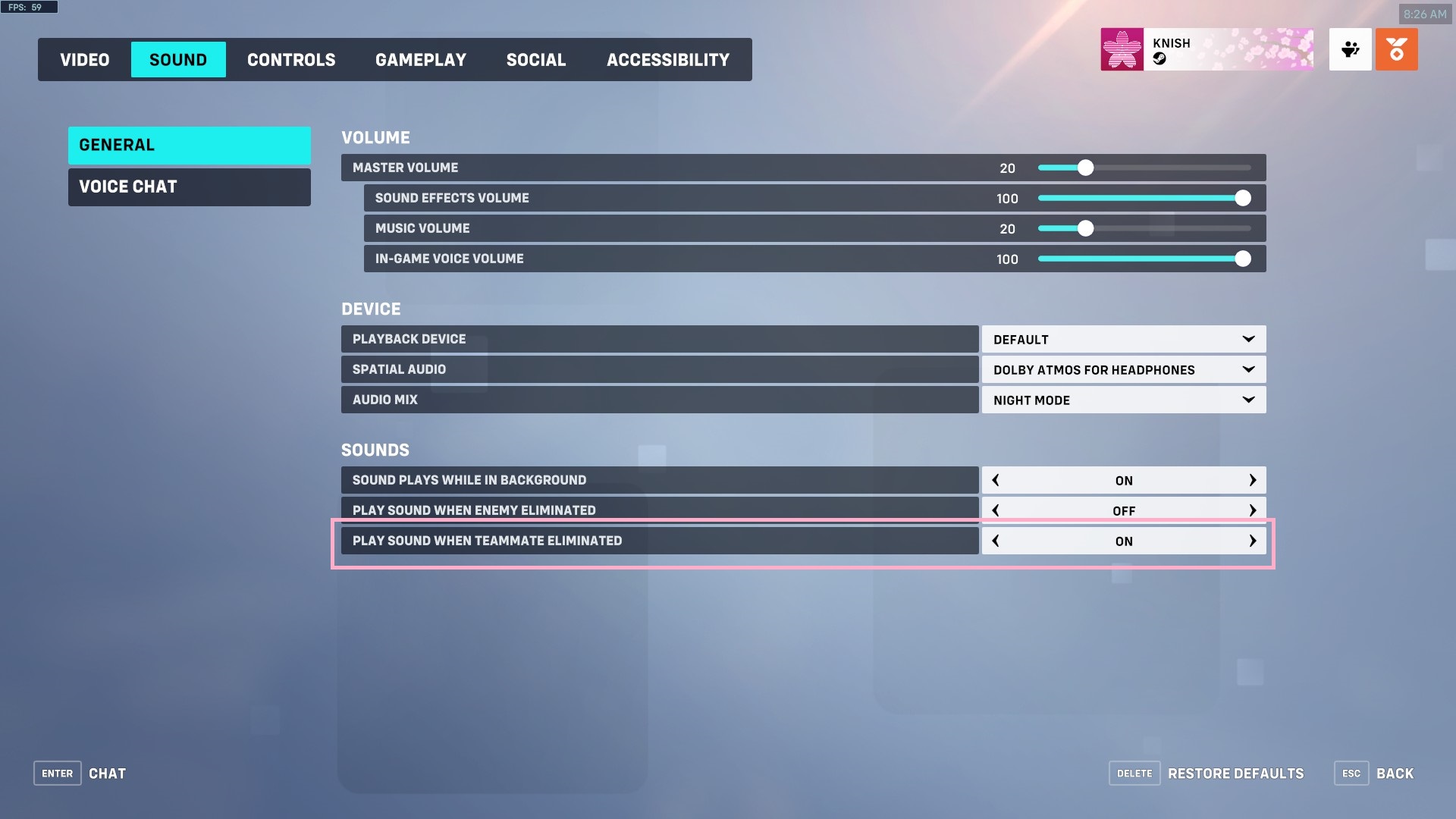
Sound When Teammates get Elimanted
Sound > General
Turn on "Play sound when teammate eliminated"
- Plays a ping sound when a teammate dies
- Helps in staying mindful if your teammates are Eliminated
- Reminder for checking Kill feed and position Better
Better Hit-reg with your Aim (IMPORTANT)
Gameplay > General
at the bottom
Turn on "Enable high precision mouse input"

Less Shakes/Motion Sickness
** Acessibility > General
Copy the settings in the image for least amount of screen shakes**
- better Aim/Focus on target

Transparent Waypoint/Objective HUD
** Gameplay > HUD
Reduce "Waypoint Opacity" to a lesser number, preferably 50 or under**
- Prevents enemies from sometimes hiding being the waypoint HUD on screen

Critical Subtitles
** Accessibility > Subtitles
Copy Settings on screenshot **
- Gives you subtitles whenever an ability is used
- Sometimes picks up faint sounds as subtitles that you may miss (Competetive Advantage)"

Avoiding Invite / Deal with invite spams
**Click on social Icon next to your name in top right and set your profile to offline **
- Good for dealing with annoying friends spamming invites while you're mid game

Auto Join Team Voice chat
** Copy settings in the screenshot **
- Always makes you join team voice chat ( if you are not soloqueueing it will put you in a private lobby voice chat by default and you'd have to press P and manually switch to team chat)
Bonus tip : You can goto your career profile by right-clicking on your name top right - way less music/sounds incase you're tabbed out while queuing


Biggest Tip for Overwatch
Don't Forget this is just a video game
sometimes you may meet toxic people, sometimes they'd be toxic enough to ruin your mood
Just remember that toxic people are the problem, not you
it's okay if you're having a bad game or a bad day and are unable to perform
at the end of the day what matters is having fun.
a lot of players, especially in lower elo's have this misunderstanding that damage/heal stats are the only representation of value but that simply not true
a Sombra with great positioning and timing is still likely to not out-damage the soldier 76 on her team
but it doesnt take away from the fact that the Sombra is doing well
this analogy can be applied in many ways
Thank You
Thank You For Going through this guide!
have a fun time playing Overwatch !
If this Guide Helps you Please consider leaving a like and favouriting it :D
and rating it 5 stars ♥
Steam Awards much appreciated ♥